Arch Calendar 2.0
You gave the report an hour. It took two. You stretched the block, pushed the next one to tomorrow, and kept going. By Friday, no one remembers it was supposed to take an hour. Not even your calendar.
That gap is what Arch Calendar 2.0 is built for. With 1.0, your tasks, events, and notes moved into one calendar, so planning a day stopped taking three apps. 2.0 is the next step. Every block now keeps two records: the time you planned and the time it actually took. Put them side by side and you can finally see the distance between the day you designed and the day you lived.
We didn't add a timer to start and stop, or a journal to fill in every night. Plenty of apps ask for that, and in our interviews with Arch users, that extra input is exactly where planning starts to feel like one more chore. So 2.0 asks for nothing new. Everything it records comes from what you already do: dropping a block onto the calendar, dragging its edge, moving it to another day, checking it off.
Every plan changes. Now your calendar remembers why.
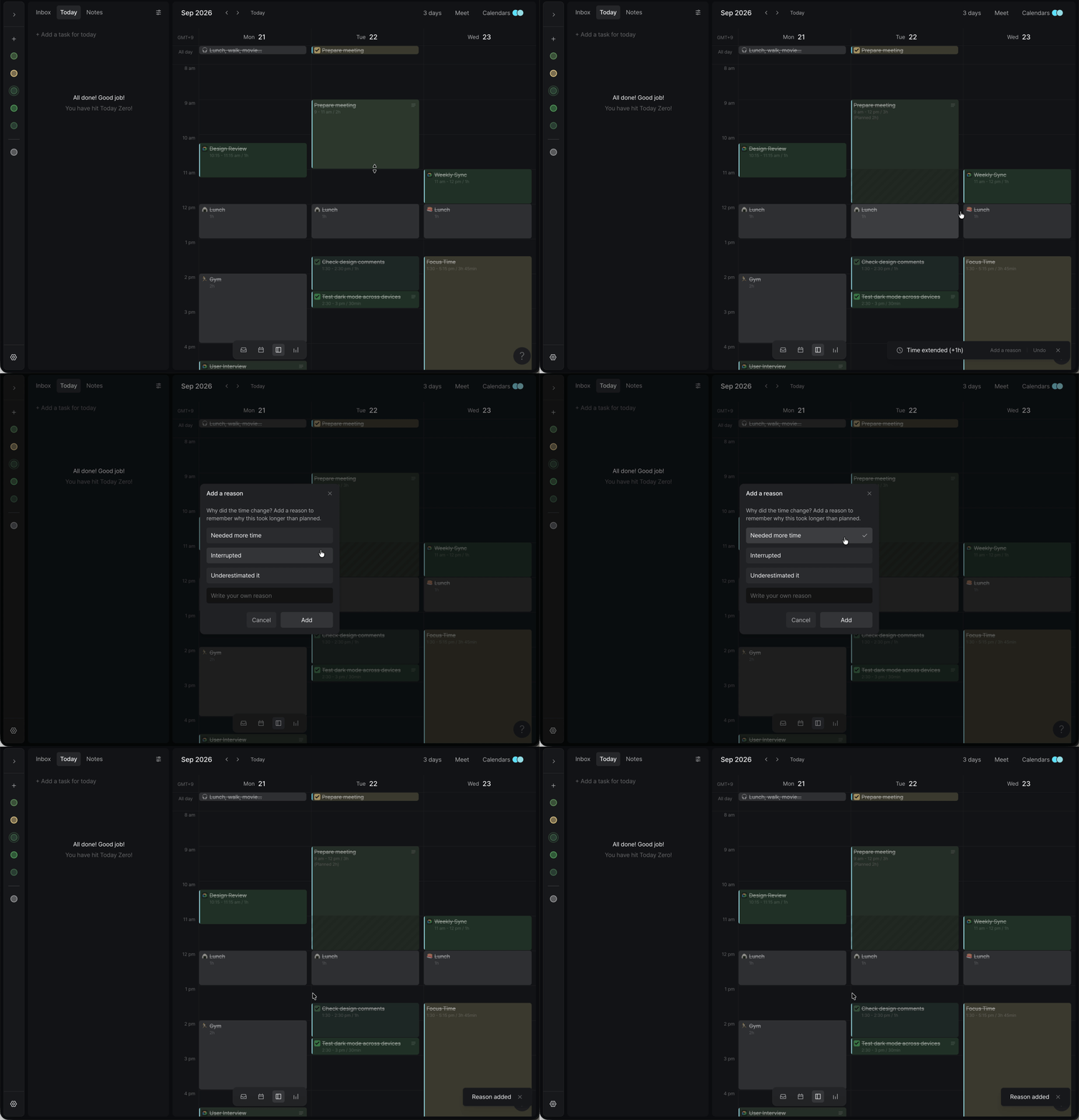
Your plan locks in the moment a block starts. Until then, rearranging your day is just planning, and Arch won't ask you about it. Once a block is underway, a change tells you something about your day. Stretch, shrink, or move a block that has already started, and the toast shows exactly what changed, like Time extended (+1h), along with an Add a reason button.
Click it and pick what happened. The options depend on the change: a block that ran long offers Needed more time, Interrupted, and Underestimated it, while shrinking or moving a block brings its own set. If nothing fits, write your own. Or skip it: the toast fades after three seconds, and the new time is recorded either way.
Each reason is saved to the block's private note under Changes, one line per edit, so every block carries its own history: +1h (15:00 → 16:00) · Needed more time · 3:10 PM. Blocks that ran past their plan also show the originally planned time right on the calendar, so an overrun is visible at a glance. You can turn that label off in Settings > Preferences. To set a block's length without dragging, open it and click the total duration. The same prompt appears there.
Analytics, rebuilt around your habits
Analytics used to be split between a Summary tab and a detailed view. In 2.0 it's a single dashboard, meant to be read the way you'd check a fitness app at the end of the week. Open it from the navigation bar or press Ctrl + 4 (Alt + 4 on Windows), pick a range, and see how your time really went.
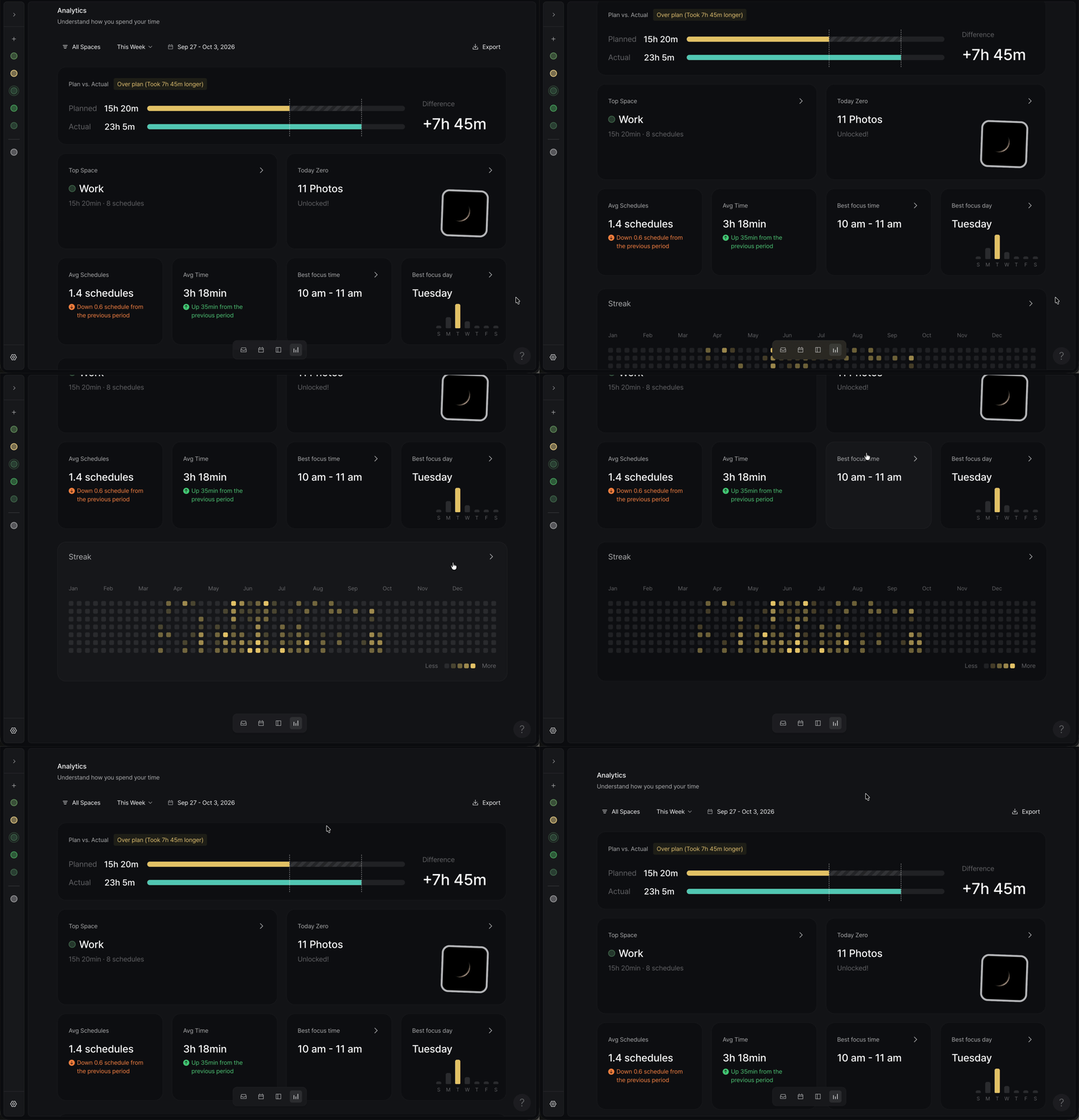
Plan vs. Actual: Your planned hours next to your actual hours, with the difference spelled out, like +6h 14m. Both bars share a dotted baseline and the gap is shaded, so you can read it in a second.
Today Zero Recap: Every Today Zero ends with a photo, and until now each one stayed with its day. The Recap brings them all together. Click the card for a monthly calendar of every day you reached zero, pick one, then use the ← → keys to flip through the rest.
Space Streak: This is where the habit tracker lives, and there's no separate checklist to maintain. Each Space now has its own streak. Any day with at least one block in that Space counts, and you'll see how many of the last 30 days you showed up. If you block time for a Writing Space every morning, that's your habit, already tracked.
Avg Schedules & Avg Time: How many blocks you plan per day and how many hours they add up to, compared with the previous period.
Top Space, Best Focus Time, Best Focus Day: Click any of them for a full-screen view. Top Space ranks every Space by time, alongside its block count and the change from the previous period.